How to Make a Website: Step-by-Step (No Code)
You can build a website without coding. I promise. Thousands of non-programmers launch a professional website every day. If you’ve been waiting for someone to tell you that getting your business online is easy, this is the post for you. There is no technical lingo or tech frustration—just six easy steps.
Here’s a quick overview:
| Step | What You Do |
| Define your goals | Decide what your site needs to do |
| Choose a website builder | Pick a no-code platform that fits |
| Select a template | Start with a ready-made layout |
| Customize your design | Add colors, fonts, and your own images |
| Add business tools | Set up bookings, a store, or live chat |
| Publish your site | Go live with your own domain name |
How to Create a Website Without Coding
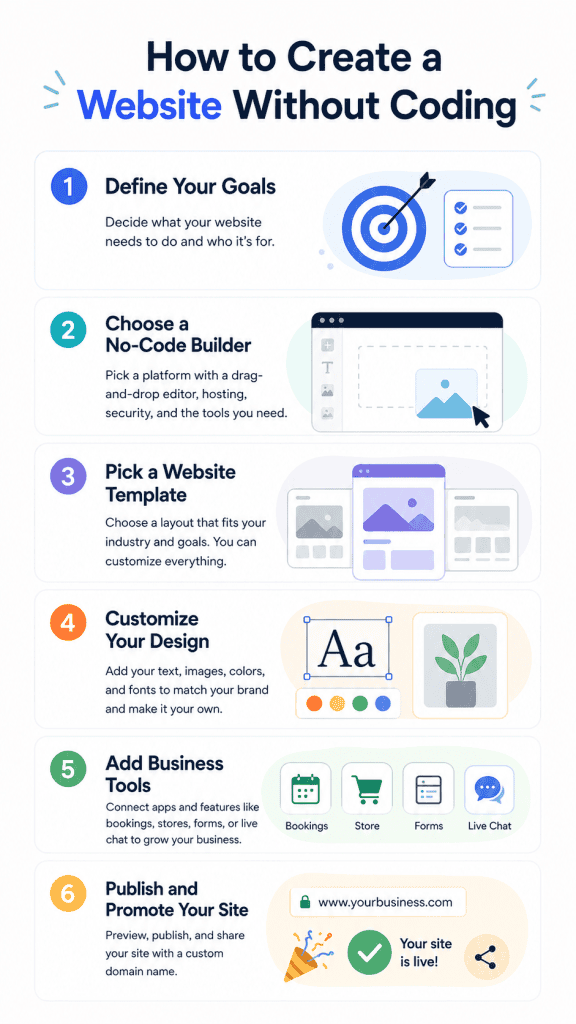
Step One: Define Your Goals
This is where to start. Before you touch a template, know why you need a website.
Do you want to sell things? Book clients? Showcase your work? Knowing the answer to this question will shape every decision you make from here on out. A freelance photographer will need a sleek portfolio. A salon owner will need to take bookings. A small brick-and-mortar shop will need an online store. Know your goal first. It will keep you on track and prevent you from adding unnecessary gadgets.
Step Two: Choose a No-Code Website Builder
This choice sets the tone for everything. A solid no-code website builder gives you a drag-and-drop editor. You move things around on a visual screen with no code at all.
Look for a builder that bundles hosting and site security into the plan. Platforms like Wix are popular picks for beginners. They give you full design control and handle all the technical background work for you.
Here’s what to look for in a builder:
- A drag-and-drop visual editor
- Built-in web hosting and security
- Mobile-ready templates
- Support for stores and bookings
- Easy custom domain setup
Step Three: Pick a Website Template
Templates save you hours of work. Most no-code builders sort their layouts by industry. You’ll find options for:
- Online stores
- Portfolios and creative work
- Restaurants and food businesses
- Service-based businesses
- Personal blogs and brands
Pick one that feels close to your vision. Don’t stress if the template is for a gym and you run a bakery. The layout is just a starting frame. You shape it into whatever fits your brand and your goals.
Step Four: Customize Your Design
This is the part where the fun begins. Upload your own images or download free stock images that resonate with your brand. Replace all that Lorem Ipsum text with your own content. Keep copy concise and easy to digest.
Update the colors and fonts to fit your brand. Most builders allow you to set global styles for your entire site. Edit one font, and it changes across your entire site, automatically. Not only does this save time, but it also makes your site look cohesive and professional (not homemade), which will help you gain your visitors’ trust. Even if you did build it yourself one Sunday afternoon.
Step Five: Add Business Tools
A website that displays text and images can do so much more. Add tools that help your business run day-to-day.
Running a salon? Add a booking system so clients can set their own appointments. Selling products? Drop into an online store. Want to talk to visitors live? Add a chat widget. Most no-code builders have an app section where you plug these in with just a few clicks.
Step Six: Publish and Promote Your Site
Before you go live, do a quick check. Read through all your text and catch any typos. Test every link. Then preview your site on a phone, because most visitors browse on mobile.
Publish your site once everything looks great. Purchase a custom domain such as www.yourbusiness.com. Not only will it instill confidence in your visitors, but it will also look infinitely more professional than something like “jackietester.yourwebsitebuilder.com”. Share it on social media. Include the link in your email signature. Tell people about it!
What About AI Website Building?
The website builder world is moving quickly these days. We recently tested Wix Vibe, which lets you build your website with AI. You chat with the AI by describing what you want, and it creates your website for you—no clicking, dragging, or dropping, just chatting back and forth. It’s an amazingly simple way to get a fully-functioning website live within minutes.
So if you’ve been waiting for an excuse to leap, finally, now’s the time. Website builders have never been easier to use, and you don’t need to know how to code!